
🟦 Loop through a list
🟦 Loop through a list
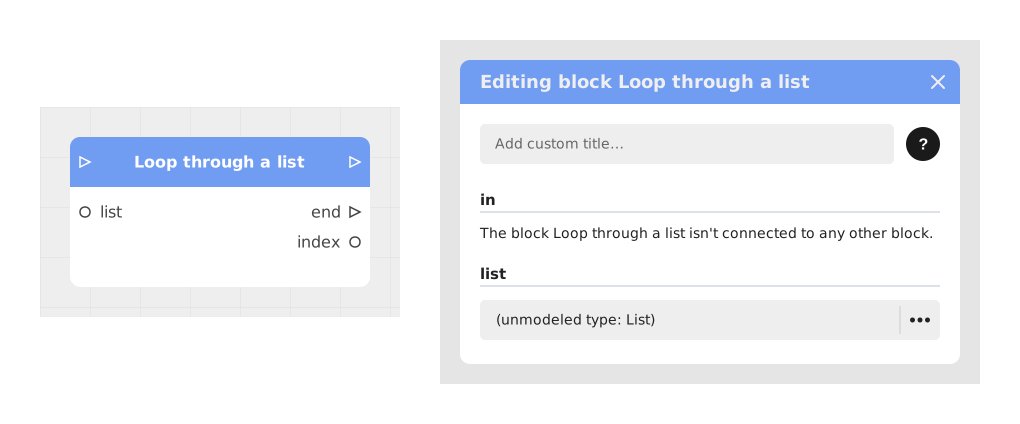
The Loop through a list block allows you to iterate over each element of a list to process them individually, like a Foreach loop in programming.
This block is essential for automating repetitive processing on data collections, such as generating dynamic interfaces or performing aggregate calculations.
📥 Entries
- in (Stream): Entry point that starts (or restarts) looping through the list.
- list (List/Table): The data source to browse. A list of texts, numbers, booleans or images.
📤 Outings
- value (Type of the list items): Value of the current element during each iteration. This output only appears once a list is connected or chosen, and is labelled « value » on the block.
- index (Number): Numerical position of the current element in the list (starts at 1).
- out (Stream): Signal triggered once per element to execute the associated processing.
- end (Stream): Single signal triggered after the last element, marking the end of the loop.
💡 Example of use
Scenario: Calculate the total of a shopping cart
- You have a basket variable containing a list of prices: [12.99, 5.50, 8.00, 3.25].
- Connect shopping cart to the list input of the Browse a list block.
- Bind the value output to a Calculate block to add each price to a total variable.
- Connect the out output to the execution flow of the Calculate block.
- At each iteration, the current price is added to the total (12.99 → 5.50 → 8.00 → 3.25).
- Once all elements have been processed, the end output triggers the display of the final total (€30.74) via a Dynamic Text block.
⚙️ Technical Details
- Type management: The type of the value output automatically adapts to the content of the list.
- Order of execution: Elements are processed sequentially, from first to last.
- Performance: Avoid blocking operations in the loop to avoid slowing down the flow.
- Edge case: If the list is empty, only the end output is triggered immediately.
Documented version: v1
Updated on: 23/09/2026
Thank you!