
🟪 Voltask Webhook
🟪 Voltask Webhook
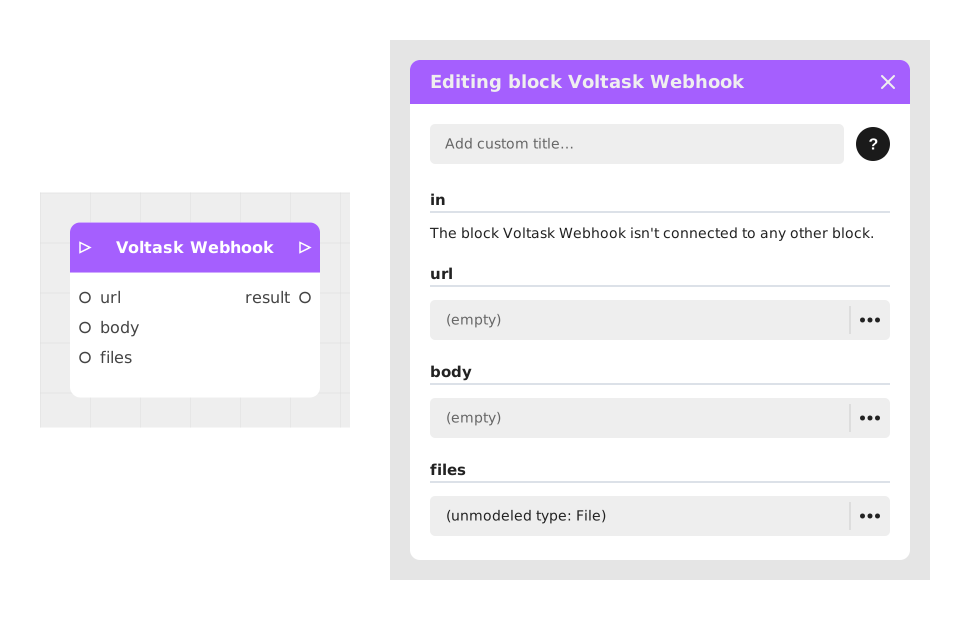
The Voltask Webhook block allows you to create a direct technological bridge between Celestory and Voltask by sending an HTTP request to this external system, to trigger back-end actions without having to set up a generic HTTP Request block.
This block is ideal for automating complex workflows and triggering powerful actions in the background, without burdening the user experience.
📥 Entries
- url (Text): Address of the Voltask webhook to call. Essential to direct the request to the correct endpoint.
- body (Text, Image or Sound): Main content sent to the webhook. For a text, the value is sent as-is (for example a JSON-formatted text built with variables); for an image or a sound, the file (or its URL) is sent instead.
- files (File or List of files): One or more files attached to the request, in addition to the body.
📤 Outings
- out (Stream): Activates once the request has been attempted or completed, regardless of possible errors (timeout, etc.), allowing you to resume the journey.
- result (Text): Raw content returned by the Voltask server, if it replies (eg: "Validated OK!").
💡 Example of use
Scenario: Transmission of data from a customer quiz to Voltask
- A user completes an interactive quiz in a Celestory application and enters their contact details (name, email, phone) via "Text entry" blocks.
- The variables V_Name, V_Email and V_Telephone are stored in the flow.
- The Voltask Webhook block is placed at the end of the route to transmit this data.
- The url entry is set to the Voltask webhook address (ex: https://api.voltask.com/webhook/12345).
- The body entry is set to a text built with the variables: {"name": V_Name, "email": V_Email, "telephone": V_Telephone}.
- When the block runs, the request is sent. Voltask receives this content and automatically triggers a workflow (e.g. sending a confirmation email or updating a database). If Voltask sends back a reply, it is available in the result exit.
⚙️ Technical Details
- Performance optimization: Unlike tools like Zapier or Make, this block is optimized for the Celestory-Voltask ecosystem, reducing latency and simplifying integration without complex analysis.
- Error management: Sending does not interrupt the journey on failure: the out exit always activates, and result stays empty if no usable reply was received (timeout, network error).
🔗 See also
- HTTP Request: for finer control (method, body, content type) over a one-off API call.
- Zapier / Make: for multi-step automations on the third-party platform side.
Documented version: v1
Updated on: 23/09/2026
Thank you!