
🟦 Webview
🟦 Webview
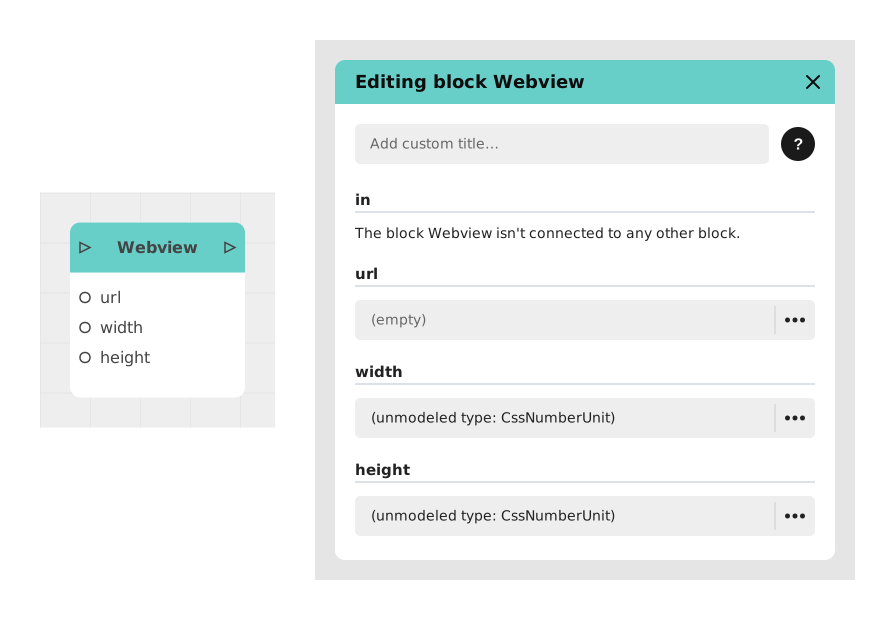
The Web View block allows you to integrate and display a web page directly in the conversation feed of your Celestory application (as a frame embedded in the flow), without redirecting the user to an external browser.
This block is ideal for including external forms, showcase sites, online documentation or services like Google Maps, while maintaining a fluid and immersive user experience.
📥 Entries
- in (Flow): Entry point triggering the display of the web view.
- url (Localized text): URL address of the page to display (must start with http:// or https://). Example: https://www.celestory.io/.
- width (Number + unit, e.g. %): Width of the display frame for the page. Default value: 100%.
- height (Number + unit, e.g. %): Height of the display frame for the page. Default value: 50%.
📤 Outings
- out (Flow): Activates when the user confirms/continues the conversation after the page is shown, allowing the journey to resume normally.
💡 Example of use
Scenario: Display an interactive map to locate a location
- The user comes to a stage where he needs to find a specific location.
- A Dialogue block explains: "Consult the map below to locate the meeting point."
- The flow is redirected to the in input of the Web View block.
- The url is set to https://www.google.com/maps?q=Tour+Eiffel,Paris, with an increased height (e.g. 70%) for a more readable map.
- The map is displayed directly in the conversation, at the size set.
- The user consults the map, then taps to continue, which activates the out exit.
- The flow continues to a Message block displaying: "Are you ready? Let's continue!"
⚙️ Technical Details
- Site compatibility: Displaying an external web page (via an iframe) depends on the permissions of the target site. Some secure sites (banks, Google services) block this integration via headers like X-Frame-Options.
- Error handling: If the URL is invalid or inaccessible, the page may display empty or as an error depending on the target site's behavior; this does not prevent the journey from continuing.
Documented version: v1
Updated on: 23/09/2026
Thank you!