
🟪 Date check
🟪 Date check
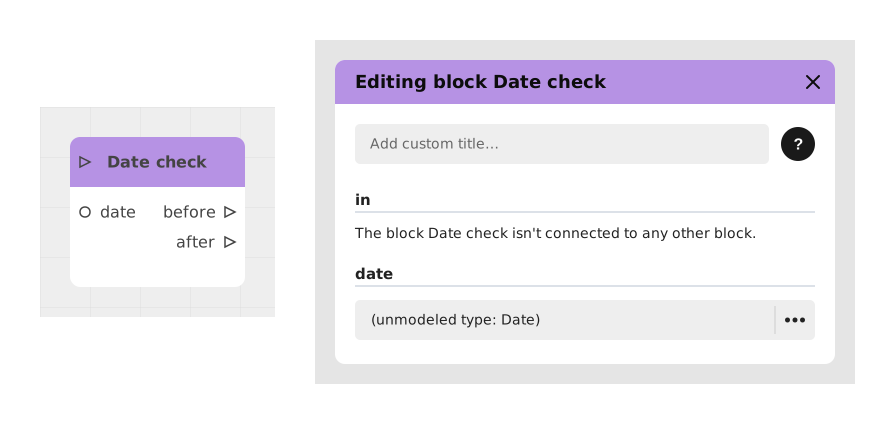
The Date Check block automatically compares the current date and time (fetched by the block itself — nothing to connect for that) to a reference date you choose, to find out whether we are before or after that date.
This block is particularly useful for managing time constraints in interactive experiences, such as time-limited promotions, seasonal events or deadline validations.
📥 Entries
- date (Date/Formatted Text): Reference date the current date and time will be compared to. Must be in compatible format (e.g. YYYY-MM-DD or YYYY-MM-DDTHH:MM:SSZ).
📤 Outings
- before (Stream): Flow activated if the current date and time are before or equal to the reference date.
- after (Stream): Flow activated if the current date and time are strictly after the reference date.
💡 Example of use
Scenario: Validation of a promotional code before expiration
- A user enters a promotional code into your Celestory module.
- The flow triggers the Date check block, configured with the reference date 2024-12-31 in the date field.
- The block then compares this date to the current date and time on its own, with nothing else to set up.
- If we are before December 31, 2024, the flow takes the before output and applies the discount.
- If we are after, the flow takes the after output and displays a message: "Sorry, this promotion has expired."
⚙️ Technical Details
- Date format: The block expects a strict ISO format (YYYY-MM-DD or YYYY-MM-DDTHH:MM:SSZ). Format errors can cause unexpected behavior.
- Time zone: The current date and time are fetched from an online service, always set to the Europe/Paris time zone (not configurable). Keep this in mind if your story is aimed at an audience in another time zone.
- Error handling: If the service providing the current date and time is unavailable, the block defaults to the before output.
Documented version: v1
Updated on: 06/09/2026
Thank you!