
🟪 QTE
🟪 QTE
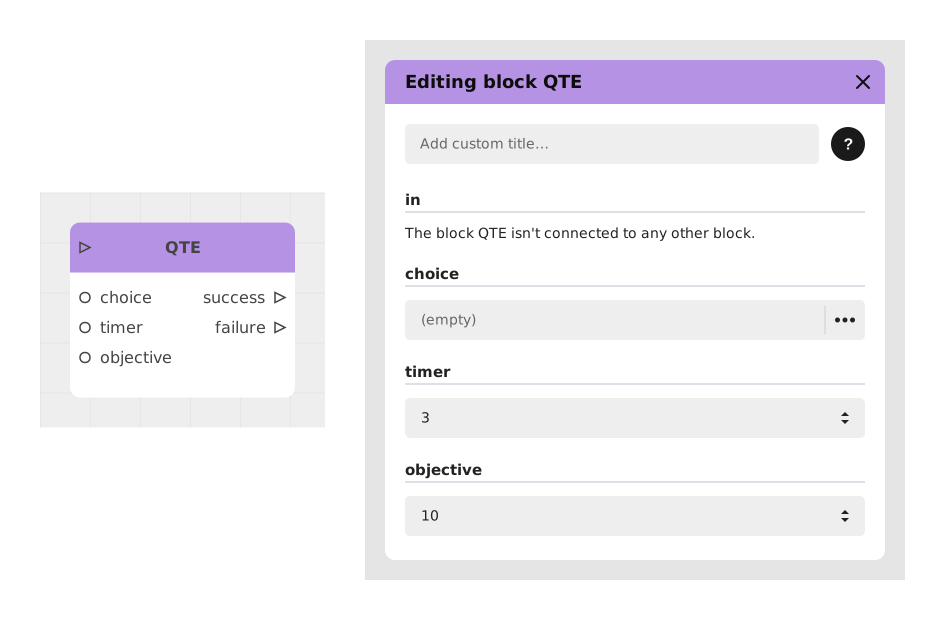
QTE stands for "Quick Time Event": this block creates a fast, timed challenge where the user must act quickly (for example, tapping the screen several times) before a timer runs out, or they fail.
Inspired by video game mechanics, this block is ideal for simulating tense situations such as a flight, a fight or an urgent action requiring an immediate reaction.
📥 Entries
- in (Flux): Immediately triggers the QTE event.
- choice (Localized text): Instruction text displayed to guide the user (eg: "Press quickly!", "Run away!").
- timer (Number): Maximum duration (in seconds) to accomplish the objective. Default: 3 seconds.
- objective (Number): Number of pressures required to succeed. Default: 10.
📤 Outings
- success (Flow): Path taken if the user reaches the objective before the end of the timer.
- failure (Flux): Path taken in case of failure (timer expired or inaction).
💡 Example of use
Scenario: Escaping an explosion
- The player finds himself in a burning building and must escape before it collapses.
- The flow activates the QTE block to simulate the race to the exit.
- Block configuration:
- choice: "RUN TO THE EXIT!"
- timer: 4 seconds
- objective: 15 rapid presses
- If the player succeeds, the success exit leads to a successful escape cutscene.
- In case of failure, the failure exit triggers a game over screen.
⚙️ Technical Details
- Interface blocking: During QTE, the screen is locked to maximize immersion and tension.
- Multilingual support: The choice text is compatible with translation systems.
- Visual feedback: A progress gauge or animated effect on the button is usually displayed to guide the user.
Documented version: v1
Updated on: 23/09/2026
Thank you!