
🟧 Scene
🟧 Scene
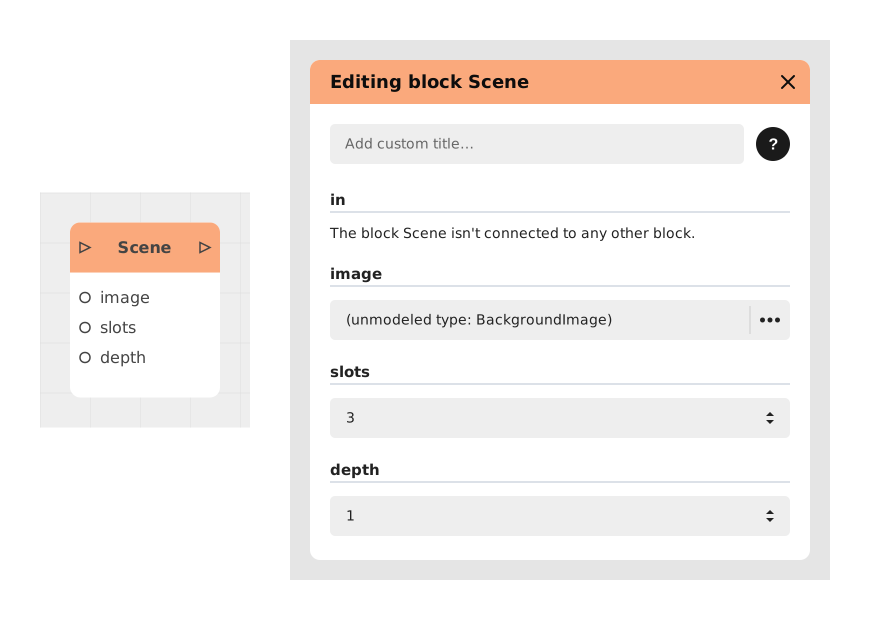
The Scene block lets you set up the backdrop for a moment in your Visual Novel: a background image, a number of slots for placing characters, and a number of layers to give the display some depth.
This block gathers all the visual settings for a location in your story in one place (background, character positioning, depth), so you don't have to set them up separately every time, keeping the experience consistent.
📥 Entries
- in (Flow): Entry point of the flow. As soon as the flow reaches this block, the settings below are applied automatically, with no extra action needed.
- image (Background image): The image used as the scene's backdrop.
- slots (Number, default 3): The number of slots available for positioning characters in the scene.
- depth (Number, default 1): The number of layers (depth) used to render the scene's elements.
📤 Outings
- out (Flow): The flow resumes once the scene has been displayed (after interactions, dialogues or choices). Allows you to move on to other scenes or narrative blocks.
💡 Example of use
Scenario: Introduction of an enchanted forest scene
- The player completes a chapter in town and clicks on an “Explore Forest” choice.
- The flow switches to a Scene block configured with:
- Background: foret_enchantee.png
- Music: ambience_mystique.mp3
- Characters: NPC “Lutin” positioned on the left.
- The scene is displayed: the background appears, the music starts, and a dialogue opens with the elf.
- The player interacts via choices ("Speak", "Observe", "Leave"), triggering responses or animations.
- After the last choice ("Leave the forest"), the scene ends and the flow switches to a Background block to display the world map.
⚙️ Technical Details
- Technical role: Central visual controller for Visual Novels, guaranteeing the consistency of graphic elements (position of avatars, effects, transitions) and sound (jingles, atmospheres) over long sequences.
- Variable management: All configurations (background, sounds, animations) are encapsulated in the block, avoiding conflicts with other nodes.
- Optimization: Designed for intensive readings (tens of minutes) with fluid rendering of dialogues and effects.
Documented version: v1
Updated on: 23/09/2026
Thank you!