
🟦 Choice with dialogue
🟦 Choice with dialogue
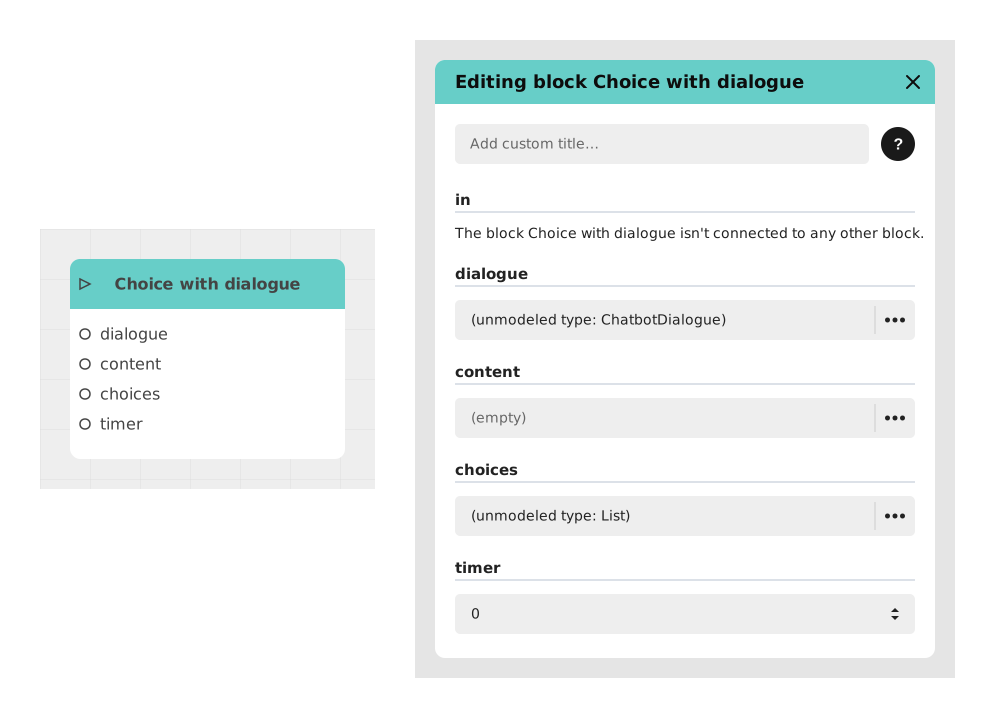
The Choice with dialogue block allows you to display a series of dialogue messages, then, once it is finished, pause the experience to offer choice buttons to the user. It is essentially a merge of the Dialogue and Choice blocks into a single node: the character speaks, then the player answers.
This block is reserved for projects based on the Chatbot Template: it does not appear in the block palette of a classic Story (visual novel), unlike the Dialogue and Choice blocks, which are available everywhere.
📥 Inputs
- in (Trigger) : Triggers the block, pauses the experience and starts the dialogue display.
- dialogue (A) : Editing space where you write the dialogue script, line by line, exactly as in the Dialogue block.
- content (Content) : (Optional) Allows you to insert media (image or sound) which will accompany the last displayed line of the dialogue.
- {{Variables}} (Text/Number/Boolean) : Words framed by {{MyVariable}} in the dialogue text automatically generate dynamic inputs to inject custom values.
- choices (List) : List of the options that will generate the buttons to display once the dialogue is finished. Each element of the list corresponds to a button.
- timer (Number) : (Optional) Time limit in seconds before the choice expires. If this parameter is empty or equal to 0, the player has unlimited time.
📤 Outputs
- (Name of each choice) (Trigger) : An output is generated for each element of the "choices" list. The flow follows the output matching the button clicked by the user.
- time out (Trigger) : This output only appears if a timer is set. The flow follows this path if the allotted time runs out without any action from the user.
💡 Example of use
Scenario: Chatbot assistant offering guidance
- A customer support chatbot welcomes the user.
- The Choice with dialogue block is placed right after the Start block.
- In the dialogue field, the creator writes: "Hello {{FirstName}}! What can I do for you today?"
- A supportActions variable of type List is created with the values: ["Track my order", "Contact an advisor", "Other request"], then selected in the "choices" field.
- The message is displayed in full first, then the three buttons appear; each one is connected to a different sequence depending on the request chosen by the user.
⚙️ Technical Details
- Internal identifier :
choiceDialogue - Block specific to the Chatbot Template : in the code, this block carries the attribute
template: 'ChatbotTemplate'and is only registered in the Chatbot Template's block list (blocks.ts); there is no generic equivalent available in other project types. - Dialogue then choice sequencing : under the hood, the block first displays the dialogue (same behavior as the Dialogue block) and only shows the choice buttons once the dialogue has been fully read by the user.
- Dynamic output generation : as with the Choice block, the number of outputs is automatically determined based on the number of elements in the list provided to the "choices" field.
- 🔺 Valid variable names : only unaccented letters, digits and the underscore (
a-z,A-Z,0-9,_) are recognized. A name containing an accent, a hyphen or a space ({{Prénom}},{{my-score}},{{ FirstName }}) is not detected: no entry is created, no error message appears, and the placeholder is displayed as-is on screen. Case matters:{{firstname}}and{{FirstName}}are two distinct entries. - Timer handling : if the timer is enabled, once the time has run out, the flow is automatically redirected to the "time out" output.
- Media : the content field only accepts image (JPG, PNG) and audio (MP3, WAV) formats; video is not supported, just like the Dialogue block.
- ⚠️ Untranslated timer field : unlike the Choice block, the editor has no dedicated translation entry for this field on "Choice with dialogue": it falls back to its internal name
timerin every language, including the French interface, where the Choice block instead shows the translated "chrono".
Documented version: v1
Updated on: 23/09/2026
Thank you!