
🔌 Using the MCP block in Celestory
🔌 Using the MCP block in Celestory
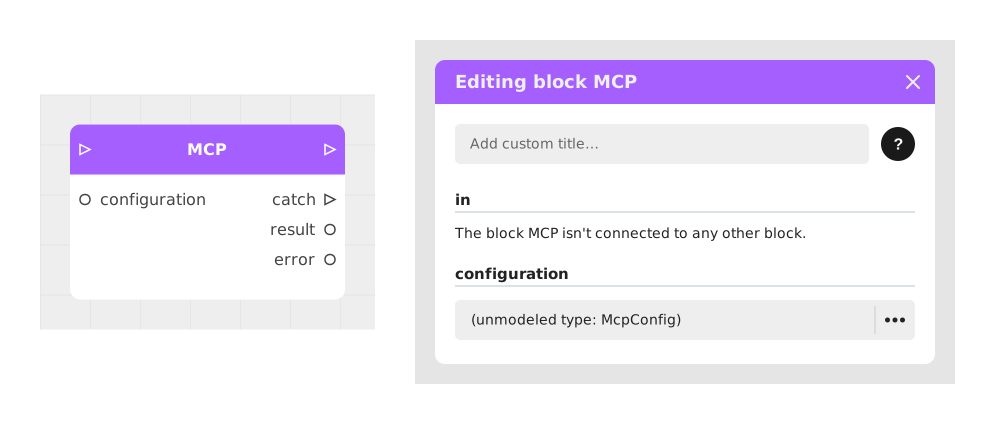
Celestory's MCP block lets your stories call the tools of any MCP (Model Context Protocol) server: read and write data, query an external service, trigger actions… A single configuration (one URL) is enough to automatically discover every available tool of a server, with typed arguments.
⚠️ Baserow, Airtable, Zapier and Make (Integromat) already have their own dedicated block in Celestory, simpler to configure. Only use the generic MCP block for a service that has no native block.
1. 🤖 What is MCP?
MCP (Model Context Protocol) is an open standard that lets an application discover and call the "tools" of an external service in a uniform way.
- An MCP server exposes tools: for instance
list_rows(list rows),send_message(send a message)… - An MCP client calls those tools: that is the role of Celestory's MCP block.
2. ⚠️ The two conditions for a service to work
Your story runs in the browser (editor or published story). Two conditions must both be met for an MCP server to be reachable from the block — if either is missing, it will not work, no matter what you do on the Celestory side:
Condition 1: the server allows your domain (CORS)
Browsers block cross-domain calls by default. The MCP server must explicitly allow it via CORS headers (Access-Control-Allow-Origin). This is a decision that belongs to the service's vendor, not to Celestory. If you host the server yourself (self-hosted), you control this configuration.
Condition 2: static-token authentication (not OAuth)
Celestory's MCP block can do two things: paste a URL, paste static headers (a JSON object, e.g. {"Authorization": "Bearer …"}). It cannot run an OAuth flow (login popup, consent, token exchange and refresh). Many major vendors now push their MCP toward OAuth exclusively — even when their CORS is open, the connection from Celestory stays blocked if authentication requires OAuth.
Remember this: open CORS does not mean it will work. Both conditions are required at once.
3. ✅ Services compatible with the MCP block
Project management focus: beyond the demo, here is how each service concretely fits into steering a project.
|---|---|---|---|
Authorization: Basic <email:API token> | searchJiraIssuesUsingJql, createJiraIssue, getJiraIssue | Surface a sprint's real progress inside the story (open/closed issues via JQL), or turn user feedback into a Jira ticket assigned to the right team, without leaving Celestory |Authorization: Bearer <personal API key> | create_issue, list_issues | Same idea on Linear: turn feedback gathered during a project into a prioritized ticket, or display a team's current progress |Authorization: Bearer <personal access token> | list_issues, create_pull_request, search_repositories | Track a project's technical progress (issues, PRs awaiting review) right inside a narrative dashboard, or file a bug issue from a test form |Authorization: Bearer <API token> | search, execute (access to the entire Cloudflare API) | Automate a milestone closing step (cache purge, deployment check) at the end of a release phase |Authorization: Bearer <access token> | search_conversations, list_articles | Surface customer feedback tied to a feature under development into the project tracker, to prioritize the backlog |Authorization: Bearer <private API key> | get_campaigns, get_metrics, get_profiles | Track a marketing project's campaign progress and performance directly from project steering |Authorization: Bearer <API key> | retrieve_subscription, list_invoices, retrieve_customer | Gate a client project milestone on its billing status |Self-hosted: your own MCP server also works — you control the reverse proxy, so you can always enable CORS and choose token-based authentication (see section 6).
Most other well-known services require a server
Figma, Notion, Slack, Stripe, PayPal, Salesforce, HubSpot, Webflow, ClickUp, Jotform, Attio, Netlify… only accept an OAuth connection (login popup, consent, token refresh) that the MCP block cannot run in the browser.
For these services, use the Voltask Webhook block instead. Voltask runs the integration server-side: it is not subject to browser constraints (CORS, OAuth). Set up the connection to the third-party service directly in Voltask, then trigger it from Celestory with a simple webhook — see the Voltask Webhook tutorial.
4. ⚙️ Configure the MCP block in Celestory
- In the graph, add the MCP block (Chatbot category).
- Click the block's config point and create an McpConfig resource.
- In the URL field, paste the MCP server's URL. The field grows automatically so long URLs stay fully visible.
- In the Headers field (JSON), add the required authentication, e.g.
{"Authorization": "Bearer YOUR_TOKEN"}. - The tool list loads automatically once the configuration is correct. Celestory detects the server's transport type on its own (modern Streamable HTTP or legacy SSE): no setting to configure on that front.
- Pick a tool: the block then creates one typed input per argument of the tool (hover the selector to read a long tool name in full).
The block also has these outputs:
- out (Stream): where the story continues when the call succeeds.
- catch (Stream): where it continues when the call fails.
- result (Object): the tool's response. If the server declares an output schema, one extra typed output appears per result field.
- error (Text): the error message when the call fails (handy to display or log).
5. 💡 Example: listing GitHub issues
Scenario: display in the story the number of open issues of a repository.
- Create a personal access token (PAT) on GitHub (Settings → Developer settings → Personal access tokens), with read-only
reposcope. - Configure the MCP block: URL
https://api.githubcopilot.com/mcp/, headers{"Authorization": "Bearer YOUR_PAT"}. - Pick the
list_issuestool (or equivalent depending on the exposed version), fill inownerandrepoon the generated inputs. - Wire out to a screen displaying the content of result, and catch to a screen displaying error.
- Test: the issue list appears. 🎉
The same principle applies to any other MCP server that accepts a static token (Chargebee, your own MCP server, etc.): only the URL and tool names change.
6. 🛡️ CORS on your own MCP server (self-hosted)
If you build or host your own MCP server (n8n, NocoDB, or a custom one), add these headers to your reverse proxy (nginx, openresty…) for your MCP server's route:
location /your-mcp-route/ {

    if ($request_method = OPTIONS) {

        add_header Access-Control-Allow-Origin "https://creator.celestory.io" always;

        add_header Access-Control-Allow-Methods "GET, POST, OPTIONS" always;

        add_header Access-Control-Allow-Headers "content-type, accept, authorization" always;

        add_header Access-Control-Max-Age 86400 always;

        return 204;

    }

    add_header Access-Control-Allow-Origin "https://creator.celestory.io" always;

    proxy_pass http://your-mcp-backend;

    proxy_http_version 1.1;

    proxy_set_header Connection "";

    proxy_buffering off;        # required if your MCP server uses an SSE stream

    proxy_cache off;

    proxy_read_timeout 24h;

}
Replace the origin with the domain(s) where your story runs (editor and publication domain). Access-Control-Allow-Origin accepts a single value: to allow several domains, have your proxy reflect the origin dynamically (nginx map on $http_origin).
7. 🚑 Troubleshooting
- "MCP server unreachable (network error, or the MCP server does not allow this origin via CORS)" → CORS closed (condition 1) or network issue: re-read section 2.
- "MCP legacy SSE: opening the stream failed (HTTP 401/403)" or a tool-call error mentioning authentication → invalid/expired token, or the server requires OAuth (condition 2): re-read section 2 and the table in section 3.
- "MCP legacy SSE: opening the stream failed (HTTP 404)" → the URL is wrong.
- "MCP legacy SSE: no endpoint event received from the server" → the URL does not point to an MCP SSE stream, or an intermediate proxy buffers the stream (disable buffering).
- "MCP initialize failed" → the server answered, but it is not a valid MCP server.
- A tool returns an error (the block's error output) → the message comes from the MCP server itself: check the arguments you provided.
8. 🔐 Good practices
- An API token is just a password: never share it (documentation, screenshots, e-mails…).
- Since your story runs in the players' browsers, prefer narrowly-scoped tokens (read-only, scoped to only what the story needs) over a root/admin token.
- Rotate your tokens regularly, and immediately if in doubt.
Documented version: v1
Updated on: 23/09/2026
Thank you!