
⬜ Video Display
⬜ Video Display
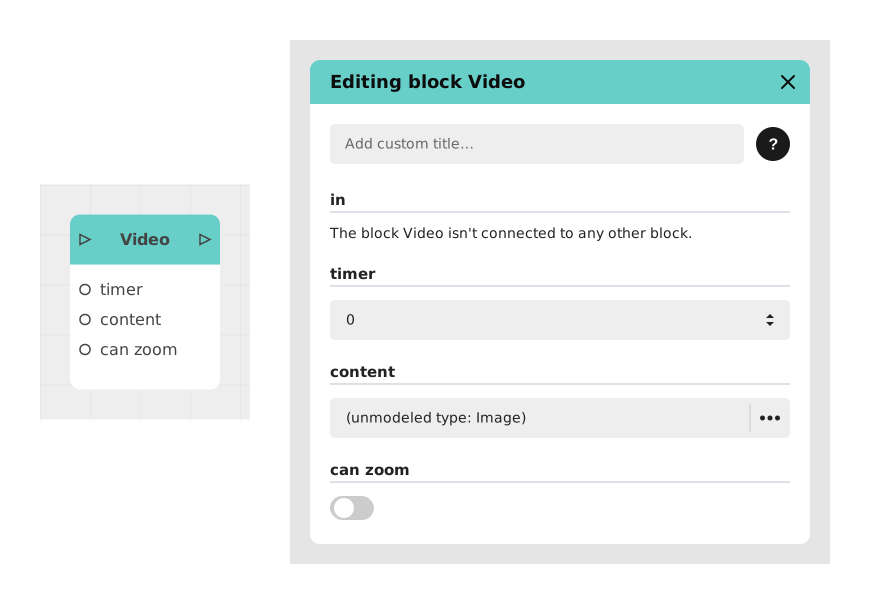
The Video Display block lets you show, in full screen, an image or video imported into the project's internal resources. It is ideal for integrating cinematic sequences, tutorials, full-screen illustrations, or "cutscene" type introductions into an interactive journey.
While it is showing, this block pauses the underlying interactivity, then automatically resumes the journey (when the video ends, or after a delay) or as soon as the user closes the display.
📥 Entries
- content (Image or Video): Image or video file imported into the project's internal resources, to be displayed in full screen. To be distinguished from the Video from URL block, which uses external sources.
- timer (Number): Delay in seconds before automatically resuming the journey. If set to 0, the block does not impose a fixed duration: it waits for the video to end naturally (or for the user to act on a zoomable image).
- can zoom (Boolean): For an image, lets the user click on it to zoom in. Has no effect on a video.
📤 Outings
- out (Stream): Activates when the video ends naturally, when the timer reaches zero, or when the user closes the display (case of a zoomable image). Allows you to resume the narrative flow.
💡 Example of use
Scenario: Cinematic introduction
- User clicks "Start Adventure" from the main menu.
- The stream immediately goes to the Video Display block.
- The video "intro_cinematic.mp4" (internal resource) is chosen as the content, with timer = 0 (the block will simply wait for the video to end).
- The video is displayed in full screen and plays to the end (2 min 30 s).
- Once playback finishes, the out exit activates automatically.
- The flow continues to a Text block reading "Chapter 1: The Beginning".
⚙️ Technical Details
- Browser restrictions: Videos with sound cannot automatically start on certain browsers (iOS Safari, Chrome) without prior user interaction (a click, for example). It is recommended to trigger this block right after a user action to avoid the sound being silently blocked.
- Resource management: Videos must be optimized for the web (MP4/H.264 formats recommended) and preloaded into project resources to avoid latencies.
Documented version: v1
Updated on: 23/09/2026
Thank you!