
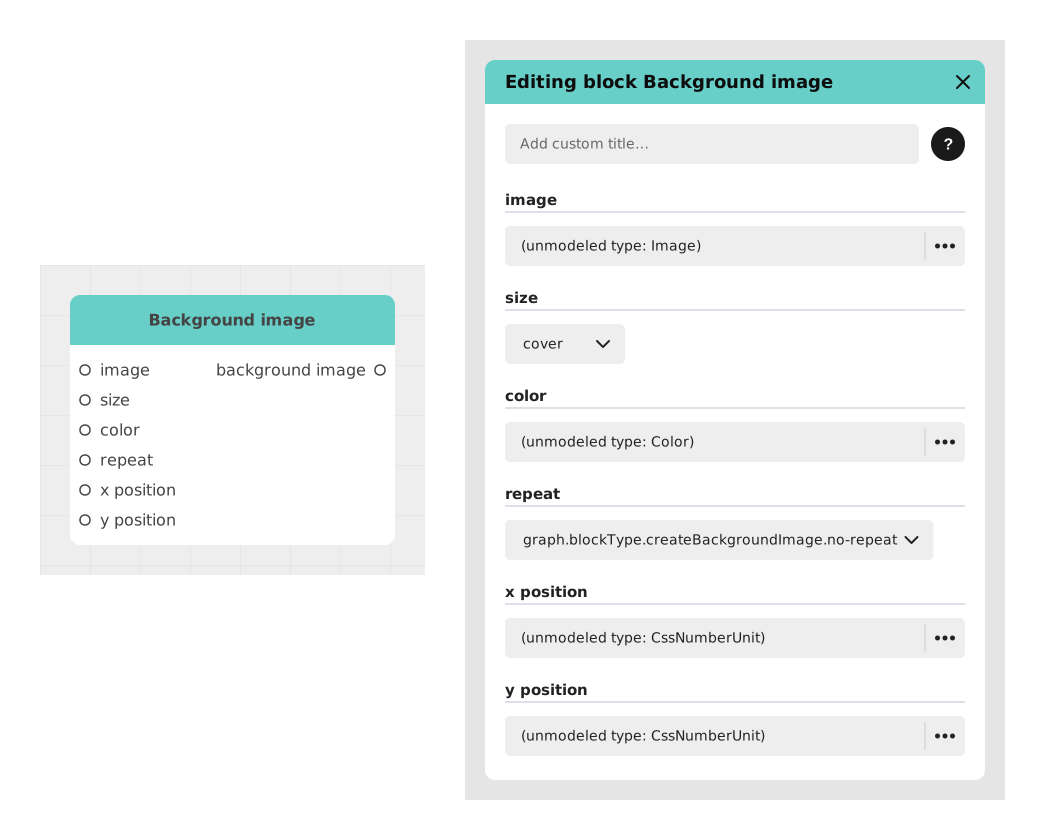
The Background Image block lets you prepare an image to be used as a background: how it should fit the screen, whether it repeats as a pattern, and where it sits.
This block does not display anything on screen by itself: it produces a ready-to-use configuration, which you then plug into the Switch Background block, which handles the transition animation (fade, zoom, duration...) and the actual display.
📥 Inputs
- image (Image): The image to use as a background.
- size (Choice): How the image fits the screen (options: Contain, Auto, Cover - default Cover).
- color (Color): Color visible around the image when it does not cover the whole screen.
- repeat (Choice): Whether and how the image repeats as a pattern (options: repeat-x, repeat-y, space, no-repeat, round - default no-repeat, meaning no repetition).
- positionX (Number + CSS unit): Horizontal position of the image within its frame.
- positionY (Number + CSS unit): Vertical position of the image within its frame.
📤 Outputs
- backgroundImage (Background image Object): The background configuration, ready to be plugged into the background input of a Switch Background block.
💡 Example of use
Scenario: Preparing a starry sky for a night scene
- The designer wants a starry sky as the background of a night scene.
- A Background Image block is added to the canvas and configured with:
- image: a photo of a starry sky
- size: Cover (to fill the whole screen)
- repeat: no-repeat (the image does not repeat)
- Its backgroundImage output is plugged into the background input of a Switch Background block.
- The Switch Background block then displays this backdrop on screen with an animated transition (fade, duration, etc.).
⚙️ Technical Details
- Value block, not a flow block: this block has no stream input or output (in/out). It doesn't sit directly in the course of the story; it plugs into the input of another block (Switch Background) which handles the actual display and animation.
- Compatibility: Works with all standard image formats (JPG, PNG, SVG) and adapts to different screen resolutions.
Documented version: v1