
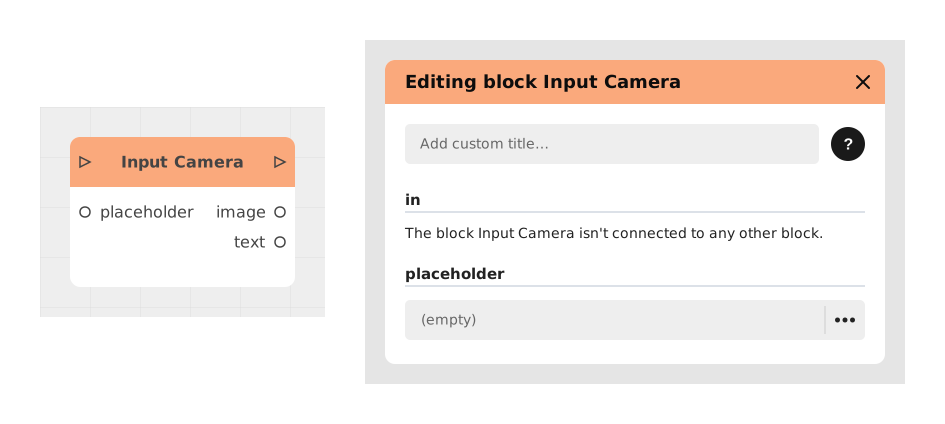
The Input Camera block lets the player take a photo with their device's camera, directly inside the story. It's a simple way to add a visual interaction, no coding needed.
This block is reserved for Business subscriptions.
📥 Inputs
- placeholder (Text): the example text shown before the photo is taken, to guide the player (e.g.: "Take a photo of your character").
- Incoming Stream: this block activates as soon as it receives an incoming stream, with no other required setting.
📤 Outputs
- Outgoing Stream: signal sent once the photo is ready, to continue the story.
- image (Image): the photo taken with the camera, usable directly by other blocks (for example to display it).
- text (Text): a text linked to the image, if the engine provides one (for example an automatic description).
💡 Example of use
Scenario: creating a custom avatar
- The player arrives on the character creation screen.
- The Input Camera block shows the placeholder "Take a photo of your face".
- After allowing camera access, the player takes a photo.
- The image output is sent to an Image Display block to show the avatar.
- The Outgoing Stream continues to the rest of the story.
🧩 Availability and rendering by template
- Available in the Chatbot and Visual Novel templates (Business subscription in both).
- Visual Novel: the camera picture fills the whole screen, with a button to take the photo, a button to switch camera and a caption field. After the shot, the player sees a preview and chooses to retake the photo or use it. In Visual Novel, the text output holds the caption typed by the player.
- Visual Novel, if the camera is not available (access denied, no camera, camera in use or non-secure page): a message explains it, with the buttons Try again, Choose an image and Continue without a photo, so the story is never blocked.
Available in the Visual Novel template from Creator version 6.1.
⚙️ Technical Details
- Permissions: this block needs camera access permission. Without it, the capture will not work.
- Compatibility: works in the browser (PWA recommended) and on mobile (iOS/Android). Requires a Business subscription.
- Storage: the image is handled automatically in memory and can be used directly by other blocks, with no technical manipulation needed.
Documented version: v2