
Updated for version 6.0.30
Celestory can keep a date in a variable and calculate with it: add days, count what is left before a deadline, write a date in the player's language. This article is for creators who handle appointments, deadlines, birthdays or a training calendar. It covers the Date variable, the seven date blocks and the Date check block.
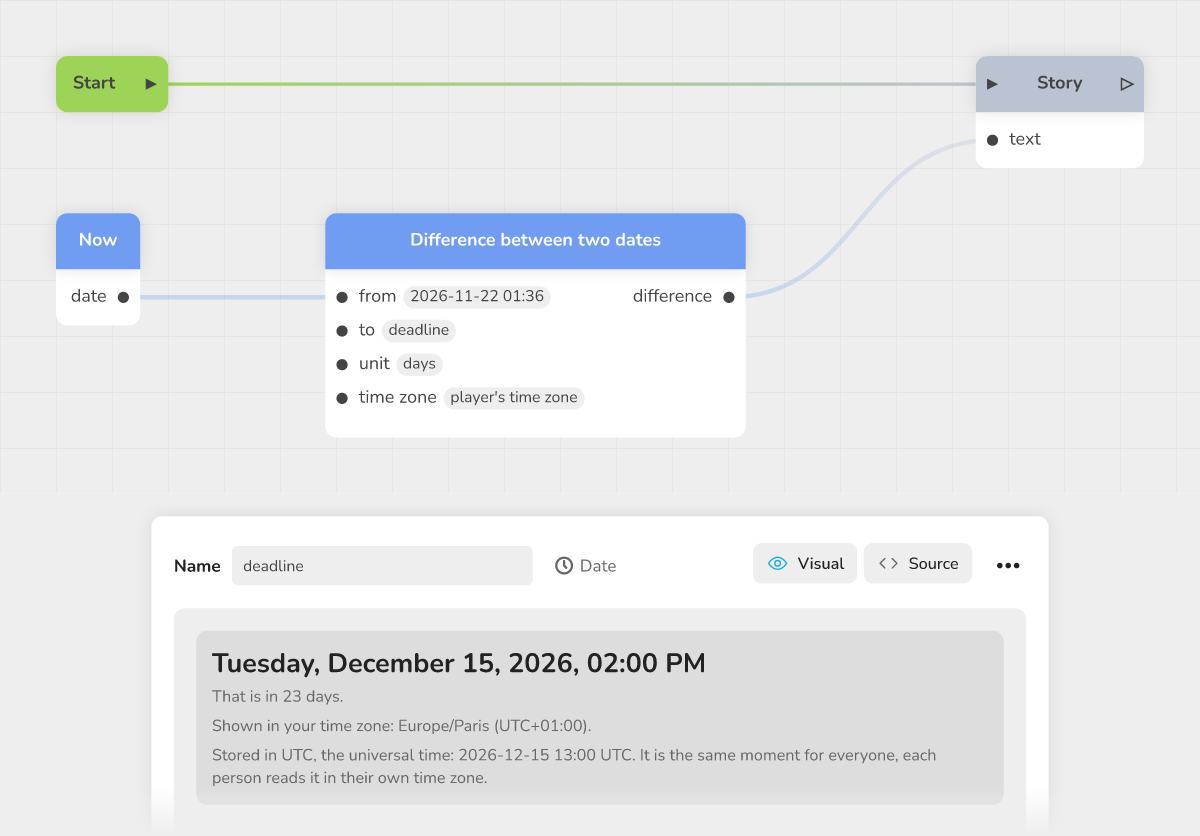 the graph with Now, Difference between two dates and Story, and the panel of the "deadline" Date variable
The Date variable
A variable of type Date keeps a precise moment: a day and a time. Create it like any variable (see Choosing a variable type) and choose the Date type ("A day and a time, like a deadline or a birthday"). When created, it holds the current minute.
Entering a date in the panel
Select the variable: the Visual panel is titled "Date and time". It offers:
- a calendar, with the Previous month and Next month buttons and Today;
- the Time, in two fields, Hours (0 to 23) and Minutes (0 to 59): you must pick a day first;
- Shortcuts: Now, Today at midnight and Tomorrow (at the same time);
- a sentence that tells where the date stands ("That is ...") and the time zone it is shown in.
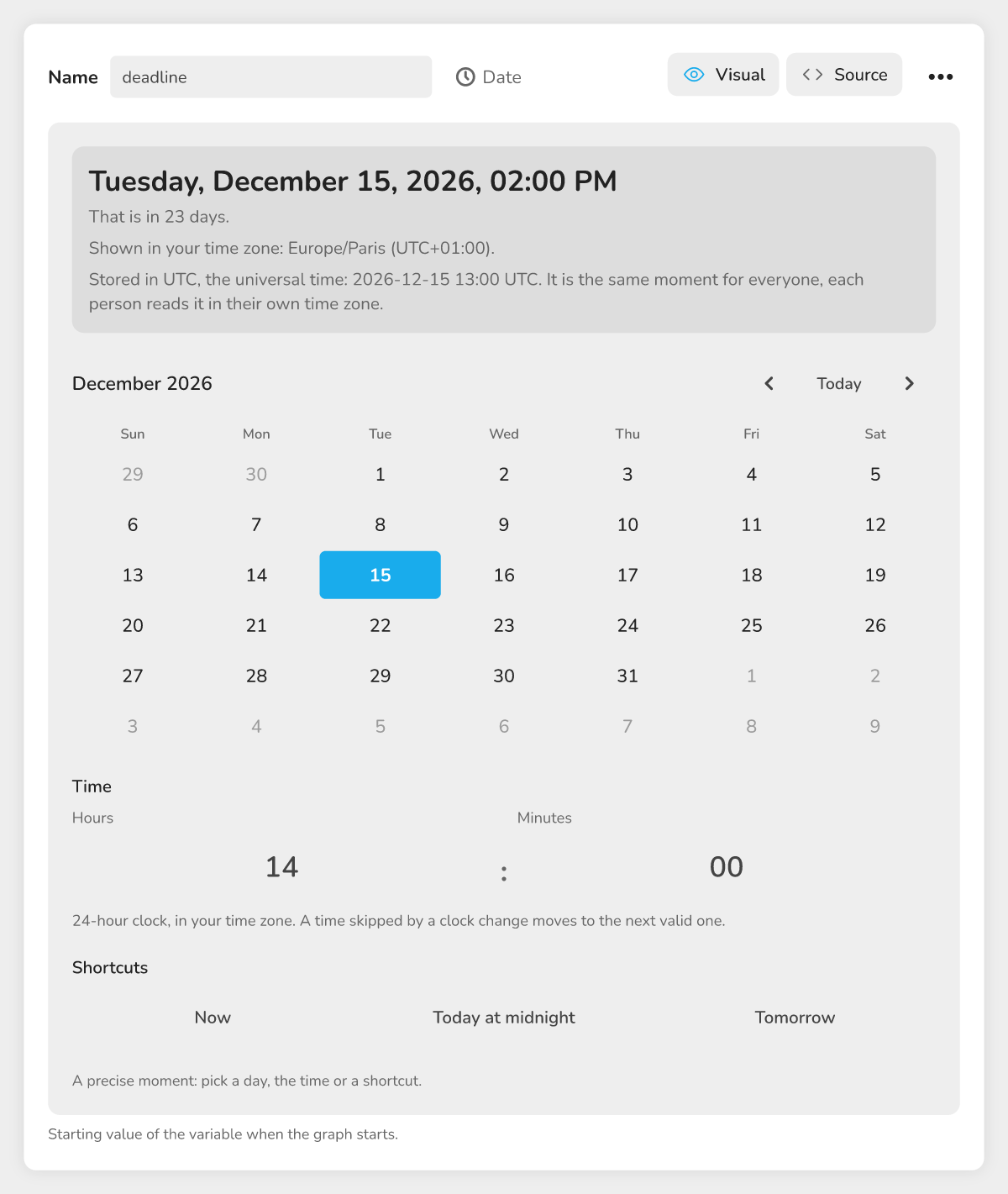 The Date and time panel with the calendar, the time and the shortcuts.
If the stored value is not a valid date, the panel says so ("This date cannot be read") and offers Replace with now.
Showing a date in a text
Write {{deadline}} in a text: the player reads the date and the time in words, in their language (for example "October 15, 2026 at 02:00 PM" in American English; the exact layout can vary slightly from one browser to another). The language is the one the player picked, otherwise the one the project is written in, otherwise the one of the device. An invalid date is written as an empty text. To choose the format, use the Format a date block.
The date blocks
Add them with a right click on the graph, Add a block, then type the name in the Search field. Date inputs accept a Date variable, the output of another date block, or a date entered directly. By default, a date input already holds a valid date: the minute you added the block.
| Block | Inputs | Outputs | Example |
|---|---|---|---|
| Now | none | date | The clock of the player's device when the block is read |
| Add to a date | date, amount, unit, time zone | result | Now + 7 days = the reminder date |
| Difference between two dates | from, to, unit, time zone | difference | Days between Now and the deadline |
| Compare two dates | (stream), first date, second date, precision, time zone | first is before, same, first is after | Branch the story depending on whether the date has passed |
| Format a date | date, format, custom pattern, language, time zone | text | "Friday 2 October 2026" |
| Extract from a date | date, time zone | year, month (1-12), day of the month, day of the week (1 = Monday), hour, minute | Find out whether it is Monday |
| Date from numbers | year, month (1-12), day of the month, hour, minute, time zone | date | Build December 25, 2026 at 8:30 pm |
Shared settings
- Unit (Add, Difference): seconds, minutes, hours, days, weeks, months or years. Default: days;
- Time zone: "player's time zone" (default) or "UTC";
- Precision (Compare): exact, same second, same minute, same hour, same day, same month or same year;
- Format (Format): short date, long date, full date with weekday, time, date and time (default), weekday, month, ISO 8601 or custom pattern.
What each block does
- Add to a date accepts a negative amount to go back. Adding one month to January 31 gives February 28 (February 29 in a leap year): the month stops at its last day.
- Difference between two dates counts whole units and gives a negative number when "to" is before "from". From October 2 at 0:00 to October 12 at 11:59 pm, there are 10 days.
- Compare two dates is a stream block: it follows the "first is before", "same" or "first is after" output. If the chosen output is connected to nothing, the story stops there.
- Format a date writes the date in the language you give (a code such as
froren-GB); if you leave it empty, it uses the player's language, then the project's, then the device's. The custom pattern follows the Moment library codes:dddd D MMMM YYYYgives "Friday 2 October 2026" in English. An empty pattern gives the date and time. - Extract from a date gives six numbers. The day of the week goes from 1 (Monday) to 7 (Sunday).
- Date from numbers refuses a date that does not exist (month 13, February 30).
Date check: the reader's clock
The Date check block (stream input and date input) follows the before output while the date has not come, and the after output once it has passed. It reads the clock of the device, never the network. If the input holds no valid date, it follows the before output. For a finer test (same day, same month), prefer Compare two dates.
The Today's date block is older: its date and date with time outputs are texts, not dates. To calculate, use Now.
Example: a countdown to an event
- Create a Date variable named
deadlineand set it in the panel. - Add a Now block and a Difference between two dates block.
- Connect the date output of Now to the from input.
- In the to input, choose the
deadlinevariable. - Leave the unit on "days".
- To show this number to the player, use a block that displays text and accepts
{{name}}slots, such as Narrator (Chatbot) or Dialogue (Visual Novel): write for exampleOnly {{days}} days left!in its text. A days input appears on the block: connect the difference output to it. The number shows as is, in whole days. The Story block does not fit: its text input does not accept a number.
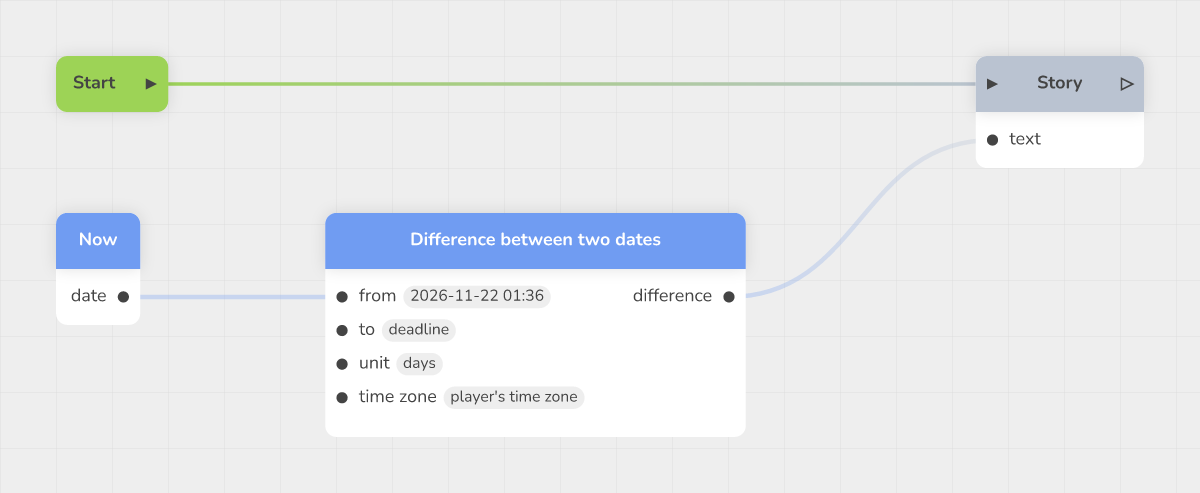 The countdown graph with the three blocks connected.
The player sees the number of days left, calculated each time the block is read.
Time zones and pitfalls
- A date is stored in UTC: it is the same moment for everyone, each person reads it in their own time zone. The panel shows it in your time zone.
- With "player's time zone", a player in Tokyo and a player in Paris can get different days for the same date. Choose "UTC" for the same result everywhere.
- Dates come from the clock of the player's device.
- A List cannot hold dates.
Troubleshooting
These error messages, written in English, point to a date block that cannot do its calculation while the story is played.
| Message | Solution |
|---|---|
| the input "..." holds no valid date | Connect a Now block, a Date variable or another date block, or pick a date |
| ... is not a date. Month goes from 1 to 12, hour from 0 to 23, minute from 0 to 59 | Fix the numbers of Date from numbers (February 30 does not exist) |